








Key takeaways
- A project management plan in QA serves as the North Star that defines quality standards, ownership, and release readiness criteria for specific initiatives.
- The 12-step framework moves from requirements collection through WBS creation, activity sequencing, and resource allocation to knowledge base development.
- Risk management directly feeds test strategy by mapping high-priority risks to specific test types, environments, and acceptance criteria.
- Documentation with context captures decisions, rationale, and approvals, serving as proof of due diligence when issues arise.
Most QA plans either lack structure or drown in excessive documentation nobody reads. Want to find that sweet spot between comprehensive coverage and practical usability? Discover the right framework 👇
Understanding the Project Management Plan (PMP)
What is a project management plan? A project management plan in QA defines what quality means for your initiative, who owns what, and how you’ll know you’re ready to ship. This document guides test strategy and risk decisions. It also informs resource allocation and go/no-go conversations before release day. You don’t create it at kickoff and forget about it. You reference it throughout delivery to keep quality standards clear and consistent.
At its core, a project management project plan blends three worlds. First, there are the classic project management elements: scope, schedule, cost, risk registers, and change control. Then you layer in your testing process system, covering test planning, execution monitoring, and completion criteria. Finally, you add quality assurance governance that defines how you initiate, control, and prove quality throughout delivery. Modern standards like ISO/IEC/IEEE 29119 treat test management as an integrated cycle of planning, monitoring, and closure.
A good PMP answers the questions that derail projects. What quality risks actually matter? Not everything deserves the same scrutiny. Payment flows need deeper coverage than footer links. Who decides what’s good enough? Clear decision rights prevent last-minute chaos when someone suddenly demands 100% automation.
How do you balance speed and rigor? You can’t deep-test every feature in a two-week sprint. The plan defines where you need thorough testing and where adequate coverage works.
What happens when things go sideways? Environments crash and third-party APIs go down. Your contingency plans keep you moving forward despite these disruptions.
Done right, your PMP becomes the single source of truth. It keeps developers, product owners, ops, and business stakeholders aligned on what quality looks like and what it costs to achieve it.
In today’s QA, an effective project management plan requires more than just a structured approach. It demands the right toolset that can evolve with your project. This is where aqua cloud, an AI-powered test and requirement management platform, stands out as your comprehensive solution for quality-focused project management. With its centralized test repository, powerful traceability features, and intuitive planning boards, aqua transforms the 12-step approach outlined below into a streamlined workflow. Instead of juggling disparate tools for risk registers, test plans, and defect tracking, aqua brings everything together in one platform where stakeholders become true partners in the quality journey. aqua’s domain-trained AI Copilot accelerates documentation and test case creation. It generates high-quality testing artifacts in seconds while maintaining deep contextual relevance to your specific project. Plus, with integrations to Jira, Azure DevOps, GitHub, and other tools your team already uses, aqua fits naturally into your existing workflow.
Boost your QA efficiency by 80% with aqua
The 12 Steps to Develop a Comprehensive Project Management Plan for Software Testing
Building an agile project management plan in QA doesn’t require a rigid recipe. You adapt a proven framework to fit your context.
Whether you work in Agile sprints or a hybrid model, these twelve steps give you a practical execution sequence. They help you avoid documentation paralysis upfront while keeping critical elements covered.
1. Collect Requirements
Before you write a single test case, understand what success looks like from every angle. Sit down with stakeholders across product, development, operations, security, legal, support, and actual end users. Pull out not just what they want, but why they care and what scares them.
Your job here is part detective, part translator. When the business says it needs to be fast, dig deeper. Fast for whom? Under what load? What’s the cost if it’s not? When security flags concerns about PII, that’s a quality risk that shapes your entire test approach.
Document these conversations in a stakeholder map. Capture who they are, what they care about, and which quality concerns keep them up at night. This becomes your input for risk-based prioritization later. When you understand stakeholder motivations, you can triage ruthlessly when timelines compress. You’ll know which corners you can cut and which ones will blow up in production. Effective requirements management ensures these insights translate into testable specifications.
A test plan is written based upon what you want to measure, and ensure that the measure is tested. From there walk back into what is being done, why it is being done and how it will be used. From a classical perspective, this will be way too much work and will result in typically double the effort it took to code it.
2. Define Project Scope
Scope defines what you’re testing and what stays out of bounds for this release. Get specific about which features you’ll cover. Be equally clear about which platforms and integrations fall within your testing efforts.
A clean scope definition includes several key elements:
- Your deliverables: test strategy, automation frameworks, environment configs, test summary reports
- Your Definition of Done at multiple levels: story, sprint, release, project
- Your assumptions and constraints
Assumptions might include stable API contracts by sprint 2. Constraints could be no budget for the device lab or a UAT window limited to two weeks due to the holiday freeze. Production-like data available in UAT is another common assumption.
Document this in a one-pager that everyone signs off on. When someone tries to sneak in additional requirements three weeks before launch, you can point to the scope doc. Then have a rational conversation about impact, risk acceptance, or timeline adjustment. Scope clarity makes trade-offs transparent and intentional.
3. Create a Work Breakdown Structure
The Work Breakdown Structure (WBS) is where you decompose the entire testing effort into bite-sized tasks. Each task should be small enough that a human can actually estimate, assign, and track it. Think of it as your quality delivery checklist, organized hierarchically so nothing falls through the cracks.
A typical QA WBS includes these components:
- Requirements review
- Test strategy and planning
- Manual test design
- Test data design
- Automation framework setup
- Environment readiness for SIT, UAT, and performance testing
- Execution cycles covering smoke, regression, and exploratory testing
- Defect triage and retesting
- Non-functional campaigns such as performance and security testing
- Reporting and release readiness
- Completion, closure, and retrospectives
Each of these breaks down further. Automation framework setup might be split into selecting tooling and building a page object model. Integration with the CI pipeline is another component. You also need to create data helpers and establish a baseline suite. The WBS isn’t a Gantt chart yet. It’s a catalog of what needs doing.
Force yourself to think through the invisible work that always gets underestimated. Test data refresh scripts take time to build. Flaky tests take time to stabilize. Logging fixes so you can actually debug failures also consumes hours. Training UAT testers requires dedicated time, too. If you don’t plan this explicitly, execution time silently absorbs it, and you miss milestones.
4. Define Project Activities
Now you translate the WBS into a clear action list. Each activity should be concrete enough that someone can pick it up, do the work, and mark it done. Improving test coverage is vague. Design integration tests for checkout flow covering payment gateway error scenarios are actionable.
Group activities logically by theme:
Requirements analysis activities
- Review user stories with acceptance criteria
- Map business rules to test conditions
- Identify data dependencies
Test design activities
- Create test cases for user registration
- Design boundary value tests for the discount engine
- Document exploratory testing charters for edge cases
Automation activities
- Automate login regression suite
- Build API contract tests for the inventory service
- Create performance baseline scripts for homepage load
Supporting activities
- Provision SIT environment with feature flags enabled
- Generate an anonymized test dataset from production
- Configure monitoring dashboards for test execution tracking
These supporting activities aren’t glamorous, but they’re the difference between smooth execution and constant blockers. They make testing possible.
5. Sequence Project Activities
Some things have to happen before others. You can’t run integration tests before you have an integrated environment. You can’t automate tests before you’ve designed what to test. You can’t sign off on UAT before UAT stakeholders are even available.
Start by identifying three types of dependencies:
- Hard dependencies where environment must be stable before execution starts
- Soft dependencies where you ideally finish test design before starting automation, but you can overlap
- External dependencies like security team availability for pen test review
Flag your critical path next. This is the sequence of activities where any delay automatically pushes your end date. Pay special attention to feedback loops as well. Defect triage feeds back into retesting. Automation maintenance happens throughout, not just at the start.
Environment instability might force you to loop back and fix infrastructure before resuming tests. Build these cycles into your sequence instead of pretending everything flows linearly.
6. Estimate Durations, Costs, and Resources
Estimation is part science, part art, and part learning from past pain. The trap is treating all features equally. A login form with standard OAuth isn’t the same as a custom payment integration with 17 edge cases and regulatory requirements.
Categorize work by risk tier to estimate accurately:
- High-risk areas covering money movement and PII handling get deeper test design, more automation, and more exploratory time
- Low-risk cosmetic changes get smoke coverage
Budget for the testability tax that teams always forget. Test data generation and refresh consume capacity. Environmental stability work consumes capacity. Observability improvements like logging consume capacity. Automation maintenance for fixing flaky tests consumes capacity, too.
If you don’t allocate 15-20% of capacity for this invisible work, your execution time will absorb it. Then you’ll blow deadlines. Estimate costs too. Tool licenses add up. Cloud environments add up. Device farms, vendor support, and training all add up.
7. Assign Resources
Match skills to tasks. Your team includes manual testers and automation engineers. You might have performance or security specialists available. Align their strengths with your WBS without overloading them.
Build a resource matrix to make this concrete:
- Map each WBS activity to required skills like test design and automation
- Map your people to those skills with proficiency levels
- Assign your strongest automation engineer to the framework build
- Put your domain expert on complex business rule validation
- Pair junior testers with leads during exploratory sessions for knowledge transfer
Don’t forget capacity planning. People aren’t 100% available. They’ve got meetings and support rotation. Bug triage takes time. Production incidents happen. Vacation is necessary. Plan for 60-70% effective capacity. If you’ve got contractor or vendor support, define handoff points clearly.
Schedule onboarding time for new team members. Include cross-training so you don’t have single points of failure. Resource allocation directly feeds into your timeline.
8. Build Contingencies
Projects don’t go according to plan. Environments go down. Third-party APIs change without notice. Key stakeholders disappear during UAT. Security finds a showstopper two days before release. The difference between a resilient plan and a house of cards is how you prepare for the unknown.
Start with a QA risk register that captures realistic threats:
- Environment instability
- Non-representative test data
- Late requirements changes
- Automation brittleness
- Third-party dependencies
- Security or compliance late findings
- Performance is not measurable early
- UAT stakeholder availability
For each risk, define impact, likelihood, and mitigation. Environmental instability? Build an environment readiness checklist with ownership and monitoring. Flaky automation? Establish a quarantine policy and fix the SLA.
Late changes? Bake change control into your process with impact assessment triggers. Add schedule buffers strategically, but don’t just tack 20% onto everything. Instead, buffer high-risk paths and integration points where unknowns cluster.
Build stabilization sprints before major milestones. Create a rollback plan you’ve actually tested, not just documented. Plan for risk acceptance because sometimes shipping with known issues is the right business call. Make it explicit with mitigation in production through monitoring or feature flags.
9. Create a Performance Measurement Baseline
You can’t steer what you can’t measure. A performance measurement baseline defines your plan state. It captures what you expected for scope, schedule, cost, and quality so you can track variance and course-correct when reality diverges.
For each dimension, establish your baseline:
- Scope baseline includes approved requirements set and the Definition of Done
- Schedule baseline includes milestone dates like test design complete and automation MVP in CI
- Cost baseline includes budget allocation for tools and environments
- Quality baseline includes requirements coverage and risk coverage
Layer in modern delivery health signals as well. DORA metrics give you a real-time pulse on flow and stability. Track deployment frequency and lead time for changes. Track change failure rate and time to restore service. Track flaky test rates for automation health. Track reopen rates and root cause categories too.
Use this baseline as your control chart. Weekly quality reviews compare actuals to baseline, flag deviations, and trigger adjustments.
10. Develop All Subsidiary Plans
Your main project management plan covers the what and when. Subsidiary plans cover the how for specialized domains. These project management plan components keep your PMP tight and readable while ensuring critical areas get the depth they deserve.
Key subsidiary plans in QA:
Test strategy
Defines what quality risks matter and what test types map to those risks. Covers automation philosophy at an executive level. Establishes environment and data strategy, plus release readiness rules. Learn more about creating a software testing plan that aligns with your overall strategy.
Quality management plan
Establishes quality criteria and acceptance criteria model. Documents traceability approach and quality metrics dashboard.
Risk management plan
Documents the risk identification process and risk scoring model. Outlines mitigation strategies and escalation triggers.
Communication plan
Specifies who gets what reports, at what frequency, through what channels. Defines stakeholder RACI for decisions.
Change management plan
Handles the scope change process and the impact assessment template. Covers approval workflow and waiver or risk acceptance procedure.
Environment and data management plan
Covers environment topology and provisioning process. Addresses test data generation and refresh cadence. Includes data masking for compliance.
Each subsidiary plan should align with your main IT project management plan template but live as a referenced artifact. You’re not drowning in a 100-page monolith this way. The test strategy might be 5 pages. The risk register is a spreadsheet. The communication plan is a one-pager with meeting cadence and report templates. Keep them modular and update them as the project evolves.
11. Document Everything
Verbal agreements get forgotten or misremembered when deadlines crunch. Documentation isn’t bureaucracy. It’s your team’s shared memory and proof of due diligence when things go sideways.
Document decisions with context. When you decide to skip performance testing for a low-traffic internal tool, capture the rationale, the risk accepted, and who approved it. When you choose Playwright over Selenium, note why it has a better API. Built-in waits mean less flakiness. This way the next person doesn’t question it six months later.
Maintain these key artifacts as they evolve:
- Project charter with objectives, scope, and stakeholders
- WBS and schedule
- RACI matrix
- Risk register
- Test coverage matrix
- Quality metrics dashboard
- Defect logs with root cause
- Change log capturing scope changes and decisions
- Meeting notes from quality reviews and retrospectives
Use lightweight tools like Confluence or Notion. Shared docs work too. Apply templates so documentation doesn’t feel like punishment. These artifacts feed your final step: organizational learning.
12. Build a Knowledge Base
Projects end, but learning should compound. A knowledge base captures what worked, what failed, and what you’d do differently. Your next software project management plan then starts smarter instead of repeating mistakes.
Start with a retrospective at project closure:
- What went well? Automation investment paid off. Early security review caught issues before they became blockers.
- What went poorly? UAT data refresh took three times longer than planned. Third-party API instability killed two days of execution.
- What surprised you? Mobile Safari edge cases we never tested. Performance degraded in production despite passing all load tests.
Feed this into reusable assets. Update your sample project management plan and project management plan example with new sections. Refine estimation models so payment integrations now get a 1.5x multiplier. Build a risk catalog showing common QA project risks with proven mitigations. Create checklists for environment readiness and release go/no-go decisions.
Archive test frameworks and scripts as starter kits. Data generators become reusable, too. Document anti-patterns like don’t start automation before test design stabilizes. Don’t skip test data planning either. Make the knowledge base searchable and structured.
Tag lessons by project type, such as Agile or migration. Tag by domain, including payments or e-commerce. Tag by theme, such as automation or environments. Host it somewhere accessible, not buried in an abandoned SharePoint. Review it during project kickoffs so teams actually use it.
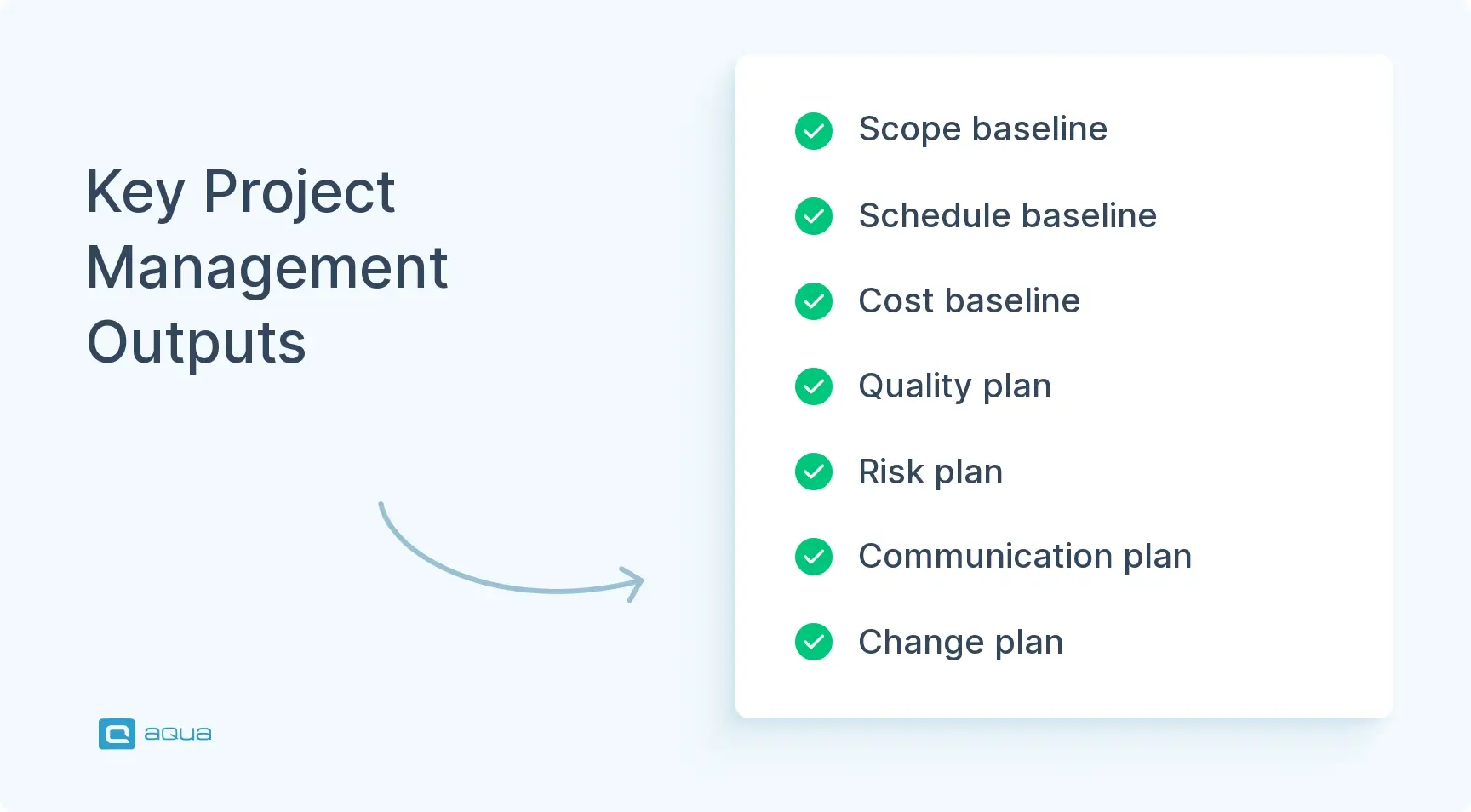
Key Outputs of the Project Management Plan
Once you’ve built your project management plan, you have a system of interconnected outputs that guide how you deliver quality. These artifacts become your shared truth across the team. You reference them daily during execution and decision-making.
1. Baseline Outputs
- Scope baseline. Defines what’s in, what’s out, and what done looks like at every level from story to sprint to release to project. Defends against scope creep and guides impact assessment when changes surface.
- Schedule baseline. Captures milestones, dependencies, and the critical path. Tracks progress, spots delays early, and communicates realistic timelines to stakeholders.
- Cost baseline. Allocates budget across tools, environments, resources, and services. Gives you control over spending and justification for investment.
2. Management Plans
- Quality management plan. Defines acceptance criteria, traceability models, and metrics. Proves quality and defines what good looks like.
- Risk management plan. Includes risk register with current mitigation status, escalation triggers, and risk acceptance process. Provides a real-time view of what could derail you and how you’re protecting against it.
- Communication plan. Spells out who needs what information, when, and through what channel. Prevents the chaos that sinks releases.
- Change management plan. Handles scope adjustments, waivers, and risk acceptance with a clear approval workflow.
3. Supporting Artifacts
- Test strategy. Documents high-level philosophy on what you test and how.
- Test coverage matrix. Maps risks to test types and environments.
- RACI matrix. Defines decision rights across the team.
- Resource plan. Shows who’s doing what and when.
- Environment and data management plan. Addresses infrastructure and test data because these are always harder than expected.
- Quality metrics dashboards. Track coverage, execution health, defect trends, and delivery stability.
These outputs aren’t static. They’re artifacts you reference in weekly quality reviews. You update them as the project evolves. You use them to make go/no-go calls at release gates. They’re also your audit trail, proving due diligence if something escapes to production or a compliance review happens.
For compliance we have to say up front what we are going to test, how we are going to test it, and how we are going to measure success or failure. The test cases provide the data by which we measure, based on the units of measure defined in the plan.
Best Practices for Successful Project Management in QA
You can follow the twelve steps religiously and still stumble if you miss the practices that separate functional plans from effective ones. Here’s what actually moves the needle when managing quality projects.
1. Make stakeholders partners, not passengers
Continuous engagement beats the classic requirements handoff pattern. Invite product owners and business stakeholders to weekly quality reviews. Show them the risk burn-down, not just test counts. When you surface a risk early, they can prioritize a fix instead of discovering it in a post-incident review. Frame conversations around business impact, not technical jargon.
2. Treat the plan as a document that evolves
Schedule monthly plan reviews, not just status updates. Ask what assumptions have changed. Ask what risks materialized or vanished. Ask what your actual velocity is versus planned. Adjust scope, timelines, or resources based on reality instead of clinging to an outdated baseline. Build this feedback loop into your governance rhythm.
3. Integrate tools that fit your flow
Don’t pick tooling because it’s trendy. Pick it because it reduces friction. If your team lives in Jira, track test execution and defects there instead of forcing a separate test management tool nobody opens. If your environments are flaky, invest in monitoring dashboards. If you’re running CI/CD, wire quality gates directly into the pipeline so failures block automatically.
4. Create tight feedback loops
Weekly quality reviews should surface blockers and risk changes. Defect trends and automation health matter too. Keep them short at 30 minutes, focused, and decision-oriented. When you spot a pattern, assign owners and track resolution. Use retrospectives not just at project end, but after major milestones to capture lessons while they’re fresh.
5. Build quality debt visibility and plan paydown
Not all technical debt is code. Flaky tests that erode pipeline trust are quality debt. Missing automation coverage in high-risk areas is quality debt. Unstable environments that burn hours are quality debt. Gaps in observability are quality debt. Log it explicitly. Prioritize by impact. Allocate capacity to pay it down. If you defer quality debt to fix later, later never comes, and your next release is harder than the last.
Effective project management in software testing requires a deliberate approach that balances structure with flexibility. The difference lies in how well you can define scope, sequence activities, estimate resources, and build contingencies while maintaining tight feedback loops. aqua cloud, an AI-powered test and requirement management solution, is purposely designed to address these exact challenges with its integrated planning tools and risk-based test prioritization. Comprehensive dashboards provide real-time visibility into your quality metrics. With aqua’s AI Copilot generating test cases and documentation in seconds, you’ll save up to 12.8 hours per tester per week. The platform’s traceability features ensure nothing falls through the cracks. Customizable reports provide stakeholders with exactly the information they need, when they need it. With native integrations to your CI/CD pipeline, project management tools, and version control systems, aqua fits seamlessly into your existing tech stack.
Save up to 97% of documentation time with aqua's domain-trained AI
Conclusion
A project management plan in QA creates alignment across your team and keeps stakeholders informed. It also sets realistic quality goals. The twelve-step framework provides a practical roadmap from requirements through closure. The most effective plans adapt as your project evolves. Use risk to prioritize where you need thorough testing versus adequate coverage. Document decisions so future teammates understand the reasoning. Integrate feedback loops for continuous steering. Make stakeholders partners by communicating in their language.



